Starter
For the team that is starting to grow
$25 USD / month
or $250 USD a year (2 months free)
- 3 users
- 10 active events
- 50 clients
- Quotes, logistics and vendors
- PDF quotes in English
- No availability engine
ON AIRFor AV and event rental companies
EventFlow connects your quotes, inventory, crew and vehicles for every event. You know what is free, who goes where and what each show actually made. No more chasing people over text.
Audio · Lighting · Video & LED · Staging · Backline — 14 days free, no card
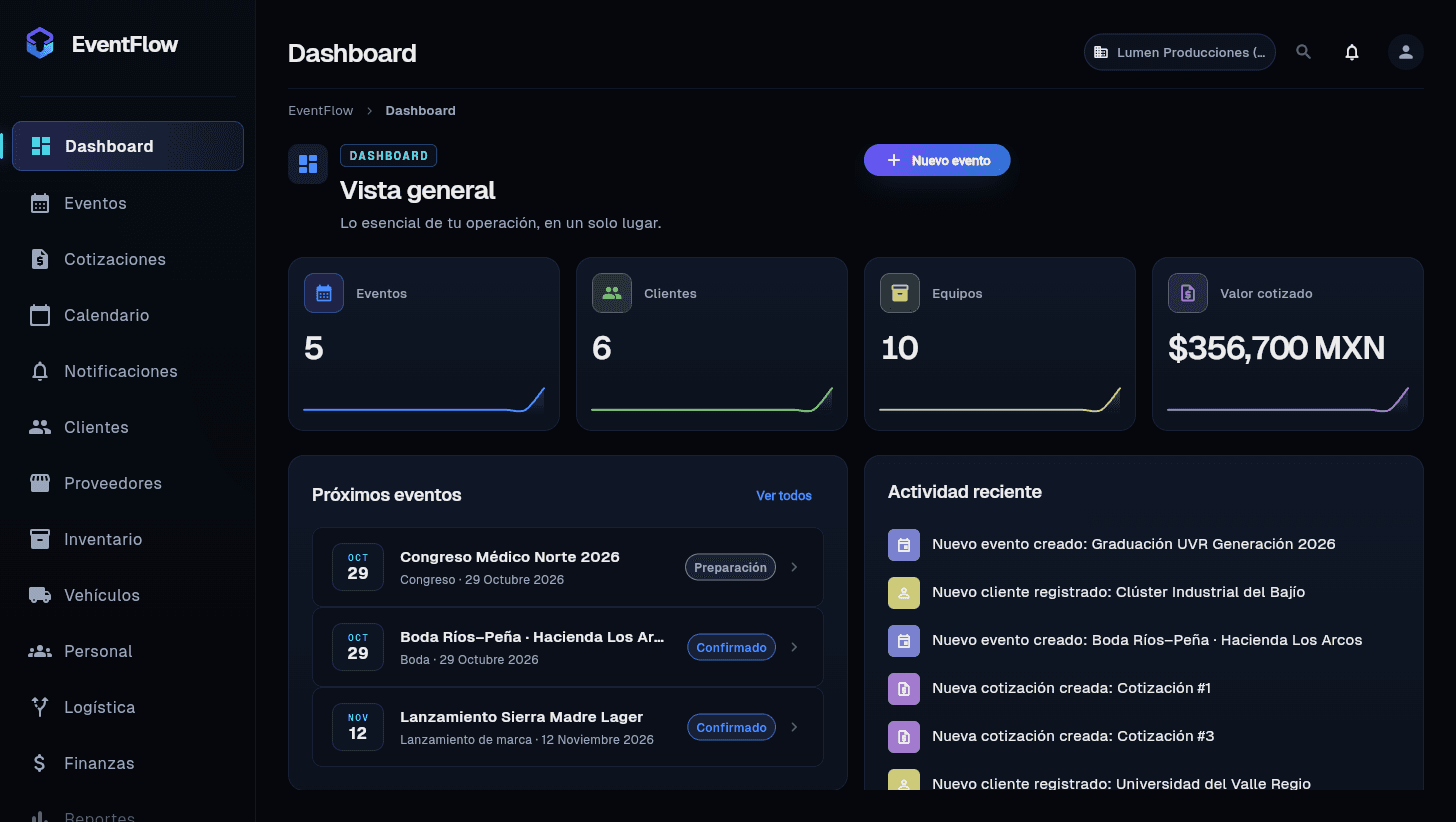
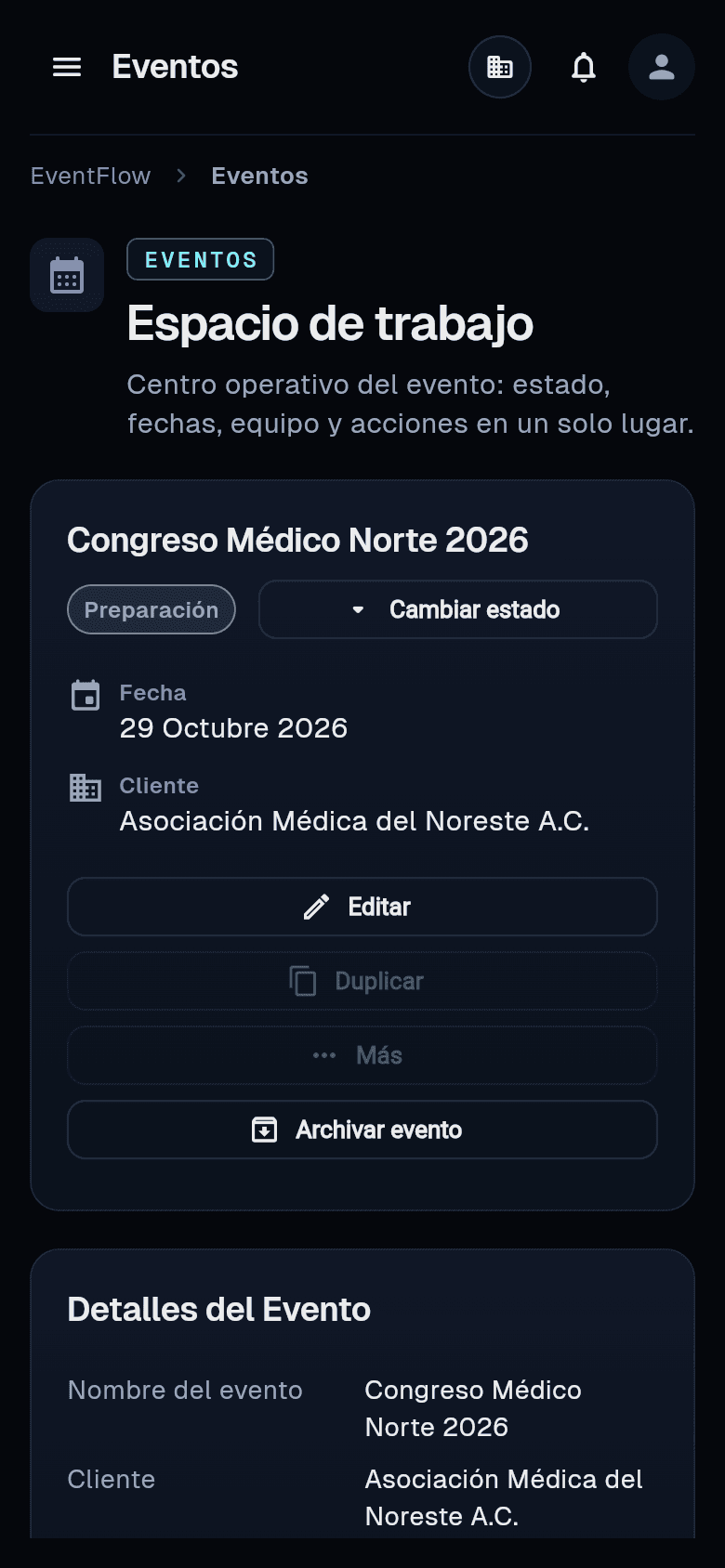
Real app screenshots (Spanish version) · sample data
CH 01Sound familiar?
You promised the LED wall to two events on the same Saturday and found out Friday night.
Three versions in the group chat and nobody knows which one the client approved.
Showed up at the venue with no access pass and no idea which dock to unload at.
You billed well, but between trucking, per diems and sub-rentals nobody knows what was left.
It is not a discipline problem. Your information just lives in ten different places.
CH 02Availability engine
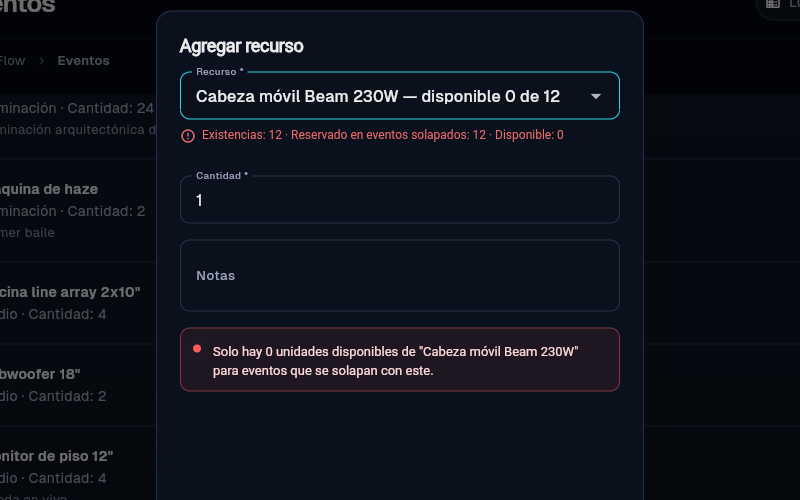
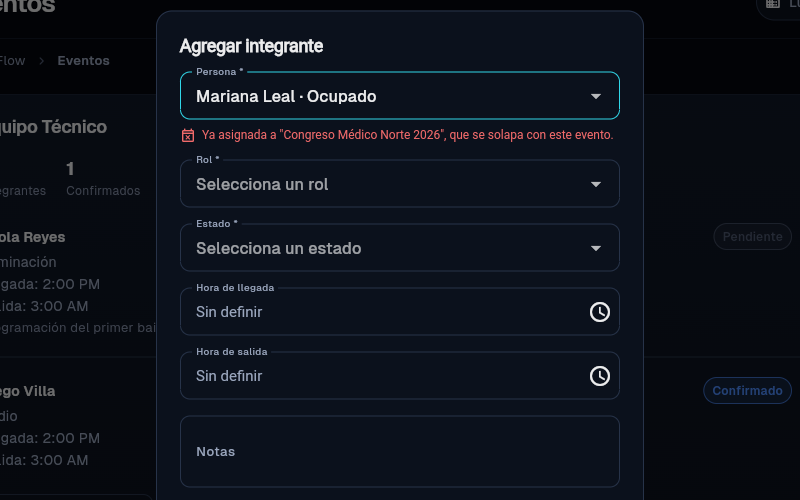
When you assign gear, techs or vehicles to an event, EventFlow checks the dates of all your events. If something is already committed, it tells you before it becomes a load-in day problem.
TRY Try to book something that is already booked.
CH 03See it work
North Medical Congress 2026 · Monterrey · audio, lighting and LED walls. This is the sample company “Lumen Producciones”: all the data is made up. The screenshots are from the Spanish version; the app runs fully in English too.
You assign inventory, techs and vehicles. If something is already booked on those dates, EventFlow tells you before it turns into a problem.
This is the moment people thank us for: you find out when you assign, not after the truck has left.
Want to try it with your own events?
Start your free 14-day trialCH 04The whole operation
Enter it once and your whole team sees it: from the quote to the warehouse, to the load-in, to the numbers.
Moving heads, line arrays, LED walls, truss and backline: stock on hand and what is assigned to each event.
Inside each event: your gear, labor and logistics line items, with a number, versions and a PDF.
Every event gets its own workspace, status and dates, on your operations calendar.
Techs, freelancers and operators with their roles: you know who goes where, and nobody ends up on two load-ins.
Box trucks, sprinters and vans per event, with driver, departure and return.
Loading docks, venue access, load-in times and reference photos for the crew.
Sub-rentals, trucking and crew catering: booked, paid and pending per event.
Client payments, payroll, trucking and per diems: the real bottom line of every event.
Your client directory with contacts and billing details, entered once.
In-app alerts when you are assigned to an event, a file is uploaded or an event is coming up.
CH 05Before and after
CH 06Who it is for
CH 07Getting started
Start with your next event and add the rest as you go.
CH 08Pricing
Every new company tries the Professional plan for 14 days, no card. When it ends you choose your plan; your data stays.
For the team that is starting to grow
$25 USD / month
or $250 USD a year (2 months free)
For rental companies with inventory and crew
$49 USD / month
or $490 USD a year (2 months free)
For production companies with several crews
$99 USD / month
or $990 USD a year (2 months free)
For operations with their own needs
Custom
Users, limits and contract built around you.
CH 09Who is behind it
I'm Edgar Márquez, and I have spent more than 10 years in the events industry. Early on I noticed that every event comes with the same snags: gear booked twice, techs without information, and shows that looked good until someone ran the numbers.
EventFlow is the tool I use to save others the years of problems I ran into along the way.
Support comes straight from the person who built it, by email at sales@eventflowapp.org. If something doesn't work for you, I want to know.
Start your free 14-day trialCH 10FAQ
If you rent or produce audio, lighting, video, LED walls, staging or backline, and you move gear and crew across several events a month, yes. It is built for the vendor who runs the event, not for selling tickets.
When you assign gear, crew or vehicles to an event, the availability engine checks whether they are already committed on those dates and flags the conflict before you confirm. It is included in Professional and Business, and in the 14-day trial.
Yes. EventFlow works in English or Spanish: you pick the language when you sign up and can switch it anytime from your account menu. Your quotes and PDFs go out in English too, with US-style dates and prices in dollars.
No. It runs in the browser on a computer, tablet or phone. Nothing to install and no servers to maintain.
No. EventFlow needs a connection so your whole team sees the same information at the same time.
Yes. One user can belong to several companies and switch between them; each keeps its data separate.
Not today. EventFlow keeps your clients' billing details and tracks income and expenses per event, but invoices and sales tax stay in your accounting software.
There is no automatic spreadsheet import yet, so your inventory, clients and crew are entered in EventFlow. You can start with just your next event and add the rest over time.
Yes. There are three roles: owner, admin and member. You invite people, give them a role, and can suspend or restore anyone's access at any time.
Starter $25, Professional $49 and Business $99 USD a month. Pay yearly and you get 2 months free. Larger operations can get a custom Enterprise plan.
No. You get 14 days of the full Professional plan, with no card and no automatic charges.
You pick a plan to keep going. If you don't, access is paused but your data is not deleted: when you subscribe, everything is where you left it.
By credit or debit card, monthly or yearly, in US dollars. Payments are processed by Stripe.
No contract. Cancel anytime from the app and keep access until the end of the period you already paid for.
Nothing is deleted or hidden. You just can't add more active events, clients or users until you upgrade or free up room, for example by archiving finished events.
Every company is isolated: nobody outside yours can see your clients, prices or events. Files are private and only open with a signed-in session and permission, never through a public link.
CUEYour next event
Try it for 14 days with an event like yours. If it doesn't help, no hard feelings.